Google Alerts is a free service offered by the Google search engine. You can use it to alert you for many keyword searches. In this post I am just showing you how to use it to find contests and sweepstakes.
Set up a Google Alert
Setting up a Google account is free.Create a free Google Account: (Skip this step if you have a Google account)
1. Click Create an account now to begin the registration process.
 2. Fill out the registration form and Submit it at the bottom of the page.
3. To activate your new Google account, access the email account that you used to register and click on the link provided to verify your new account.
Setting up a Google Alert:
1. Go to www.google.com
2. At the top right of the screen click Sign In.
3. Fill out your email address and password you setup and click Sign In.
4. Click Alerts located near the middle right on the page.
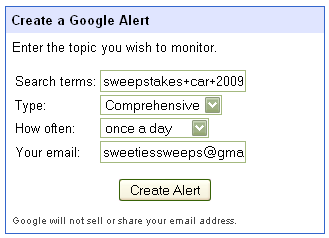
5. Type in what you want to search for.
Here is where you will put the specific things you want to search by using keywords and phrases.
Examples:
- sweepstakes
- contests
- blog contests
- enter to win
- sweepstakes +2008 -2007
6. Make sure the type is Comprehensive.
7. Choose how many times you want to be alerted with this information.
8. Type in your email address where you want to receive the alerts. (Note: this can be a different email address than the one you used to create the account)
9. Click Create Alert.
 10. To activate your new Google Alert, access the email account that you put in and click on the link provided.
To Modify Your Google Alerts:
1. Log back into your Google account at www.google.com
2. At the top right of the screen click My Account.
2. Click Alerts under My Products.
3. On the next page you will see the alerts you have set up. You can click Edit at the far right to change the search words, type, and how often you get emails.
4. Select an alert by clicking in the box next to one and then you can delete it if you like.
To learn how to use search engines to find sweepstakes and contests, take a look at my lesson plan, Effective Keyword Searches



Leave a Reply